User API \ Publish content to a social network account PHP SDK
| Resource/URI | GET | POST | PUT | DELETE |
|---|---|---|---|---|
Users /users.json
|
List all users | – | Import access token | – |
User /users/<user_token>.json
|
Retrieve user details | – | – | Delete user |
User /users/<user_token>/contacts.json
|
Read contacts | – | – | – |
User /users/<user_token>/publish.json
|
– | Publish on social networks | – | – |
Workflow
Request: the code to send to the API
Send a POST request with the following data to the resource /users/<user_token>/publish.json
to publish a message to a social network account. The <user_token> has to be replaced by the unique
user_token of an existing user.
This resource is only available for providers that have been fully configured and for users that have given consent to publish activity on their behalf. We currently support activity posting for Facebook, LinkedIn & Twitter.
The message representation ultimately depends on the provider. For Twitter for example the message will be published as a new tweet and for Facebook as a post on the user's timeline. You can publish a message on multiple social networks simultaneously, the API takes care of dispatching the message accordingly.
POST data to include in the request
		{
			"request":{
				"message":{
					"providers":[
						"#provider_key1#",
						"#provider_key2#"
					],
					"parts":{
						"text":{
							"body": "#text_body#"
						},
						"video":{
							"url": "#video_url#"
						},
						"picture":{
							"url": "#picture_url#"
						},
						"link":{
							"url": "#link_url#",
							"name": "#link_name#",
							"caption": "#link_caption#",
							"description": "#link_description#"
						},
						"uploads":[
							{
								"name": "#upload_file_name#",
								"data": "#upload_file_data#"
							}
						]
					}
				}
			}
		}
| Key | Description |
|---|---|
| * #provider_key1# | The key of the first social network to publish the message to. Example: facebook |
| #provider_key2# | The key of the second social network to publish the message to. Example: twitter |
| * #text_body# | The text to be published on the social network. |
| #video_url# | The URL of a video to be included in the publication. Example: http://www.example.com/my_video.swf |
| #picture_url# | The URL of a picture to be included in the publication. Example: http://www.example.com/my_picture.png |
| #link_url# | A link to be included in the publication. Example: http://www.example.com/my_page.html |
| #link_name# | The name of the included link. Example: My page on example.com |
| #link_caption# | The caption of the included link. Example: Visit us for more |
| #link_description# | The description of the included link. Example: Our website is about examples. |
| #upload_file_name# | The name of the file to be uploaded. Example: image.png |
| #upload_file_data# | The base64 encoded representation of the file data. Example: <?php $data = base64_encode(file_get_contents('image.png')); ?> |
Result: the code returned by the API
Resultset Example
	{
	  "response":{
	    "request":{
	      "date": "Tue, 04 Feb 2014 16:41:17  0100",
	      "resource": "/users/c1d82726-e81d-1234-1234-1234567890a/publish.json",
	      "status":{
	        "flag": "success",
	        "code": 200,
	        "info": "Your request has been processed successfully"
	      }
	    },
	    "result":{
	      "data":{
	        "message":{
	          "publications":[
	            {
	              "status":{
	                "flag": "success",
	                "code": 200,
	                "message": "Message published successfully to identity"
	              },
	              "provider": "facebook",
	              "user_token": "c1d82726-e81d-1234-1234-1234567890a",
	              "identity_token": "12345678-a1dd-42d8-aa8c-889eb0a520ba"
	            }
	          ]
	        }
	      }
	    }
	  }
	}
Example
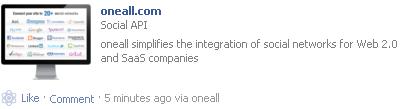
Here an example for a message published on a user's Facebook timeline.
Example Request
		{
			"request":{
				"message":{
					"parts":{
						"picture":{
							"url": "http://cdn.oneall.com/img/heading/slides/provider_grid.png"
						},
						"link":{
							"url": "http://www.oneall.com",
							"name": "oneall.com",
							"caption": "Social API",
							"description": "oneall simplifies the integration of social networks for Web 2.0 and SaaS companies"
						}
					},
					"providers":[
						"facebook"
					]
				}
			}
		}
Message Representation